
Plugins › Keying & masking

Click it. Track it. Done.
Free AI object masking for DaVinci Resolve, including the free version. Click the person or thing you want. It follows it through your clip, and a clean cut-out lands right on your timeline.
Mac with Apple Silicon (M1 or newer) · macOS 13 or newer · DaVinci Resolve 21 · Windows coming later
Demo video · coming soon
A click on a person, the tracking bar filling, then text placed behind them in Resolve.
How it works
Three steps, one window
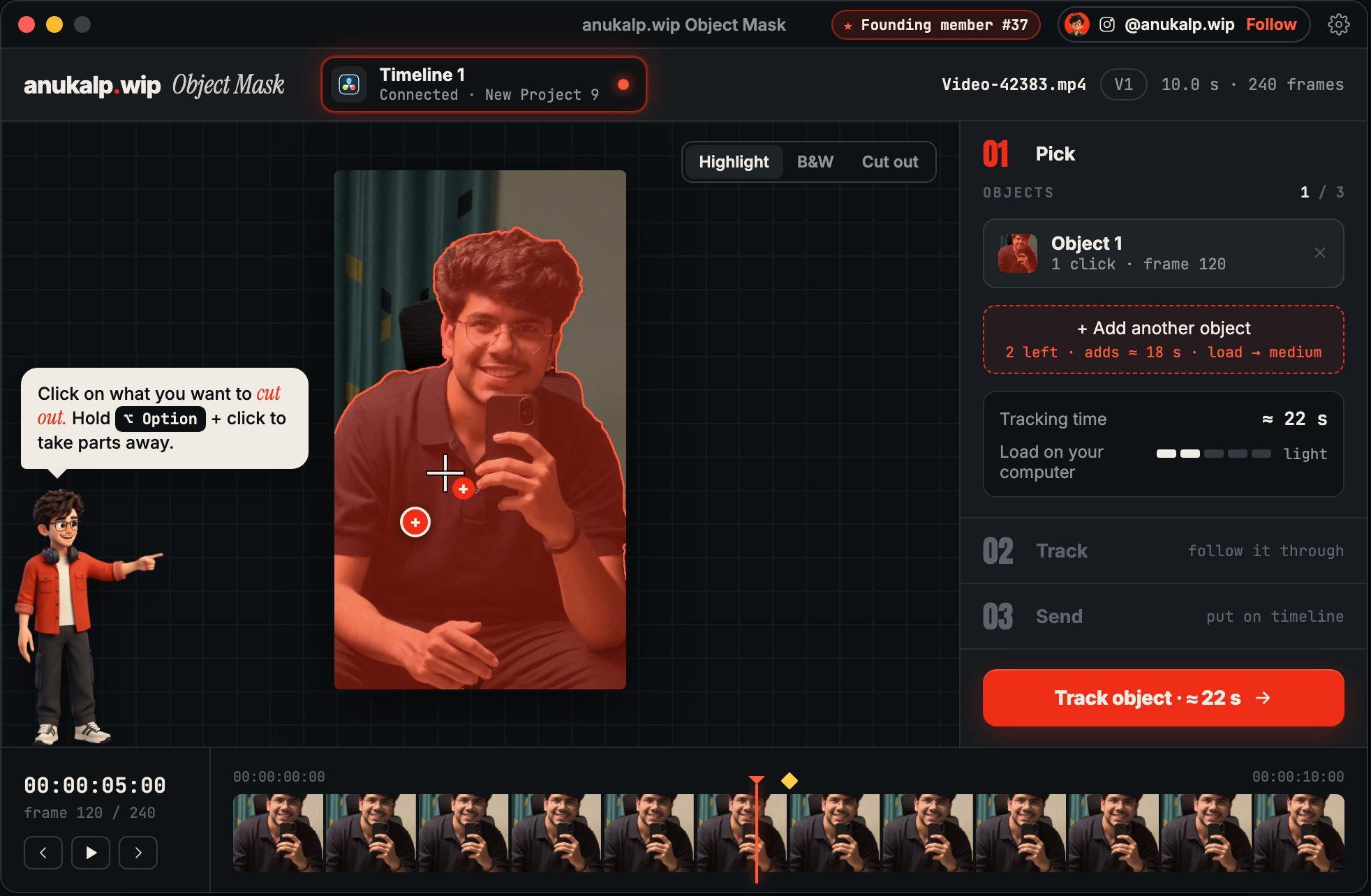
Pick
Park the playhead on a clip and run it from Workspace › Scripts. Click the object once and the whole thing is selected. Click again to add a part, hold ⌥ Option to take one away, or draw circles and polygons.
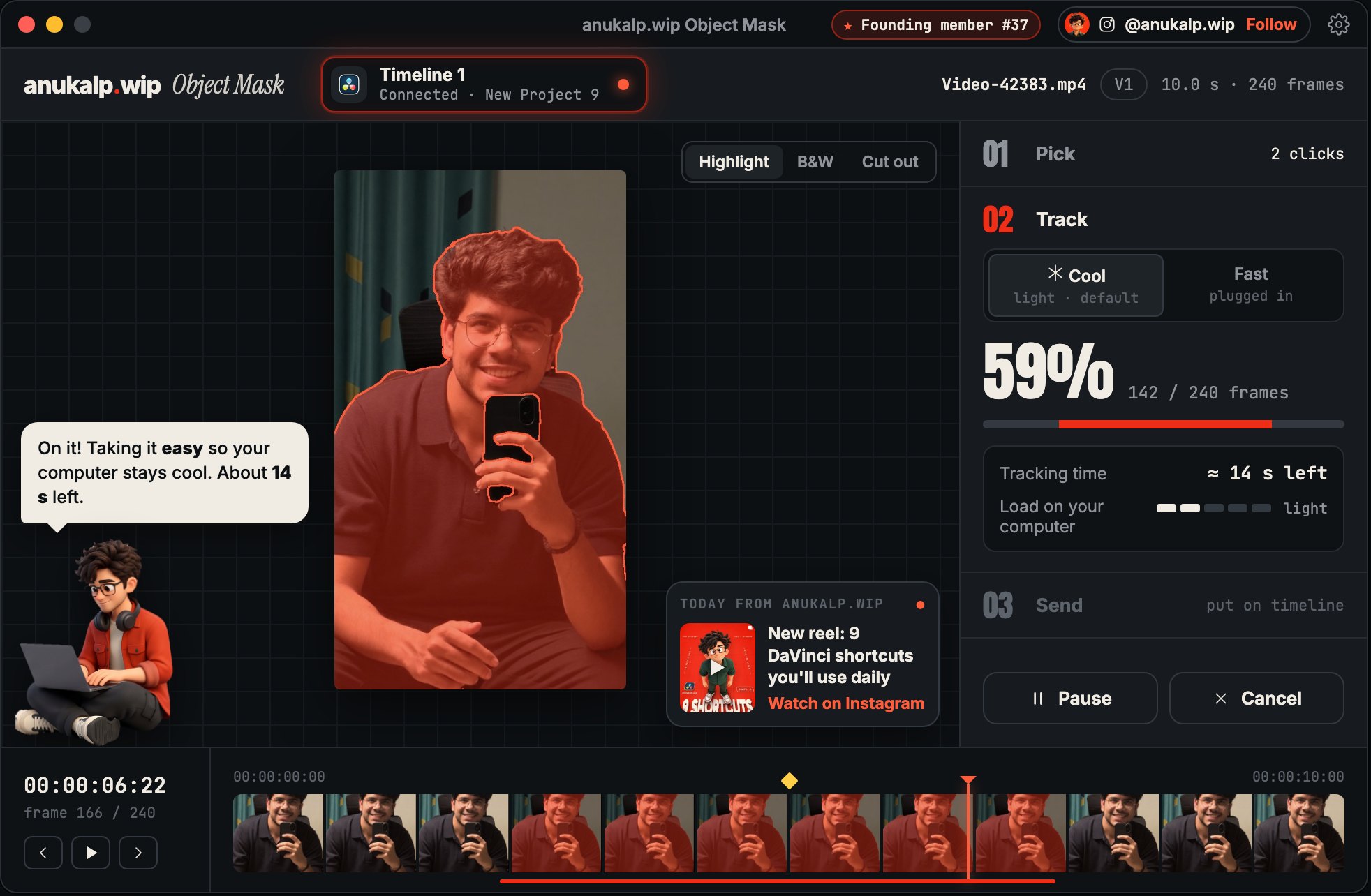
Track
It follows the object forward, backward or both ways, and stops at cuts on its own. Missed a hand on one frame? Fix this frame, fix any others, and it re-tracks them in one go.
Send
A masked copy goes on the track right above your clip, frame-exact. Your original stays untouched.
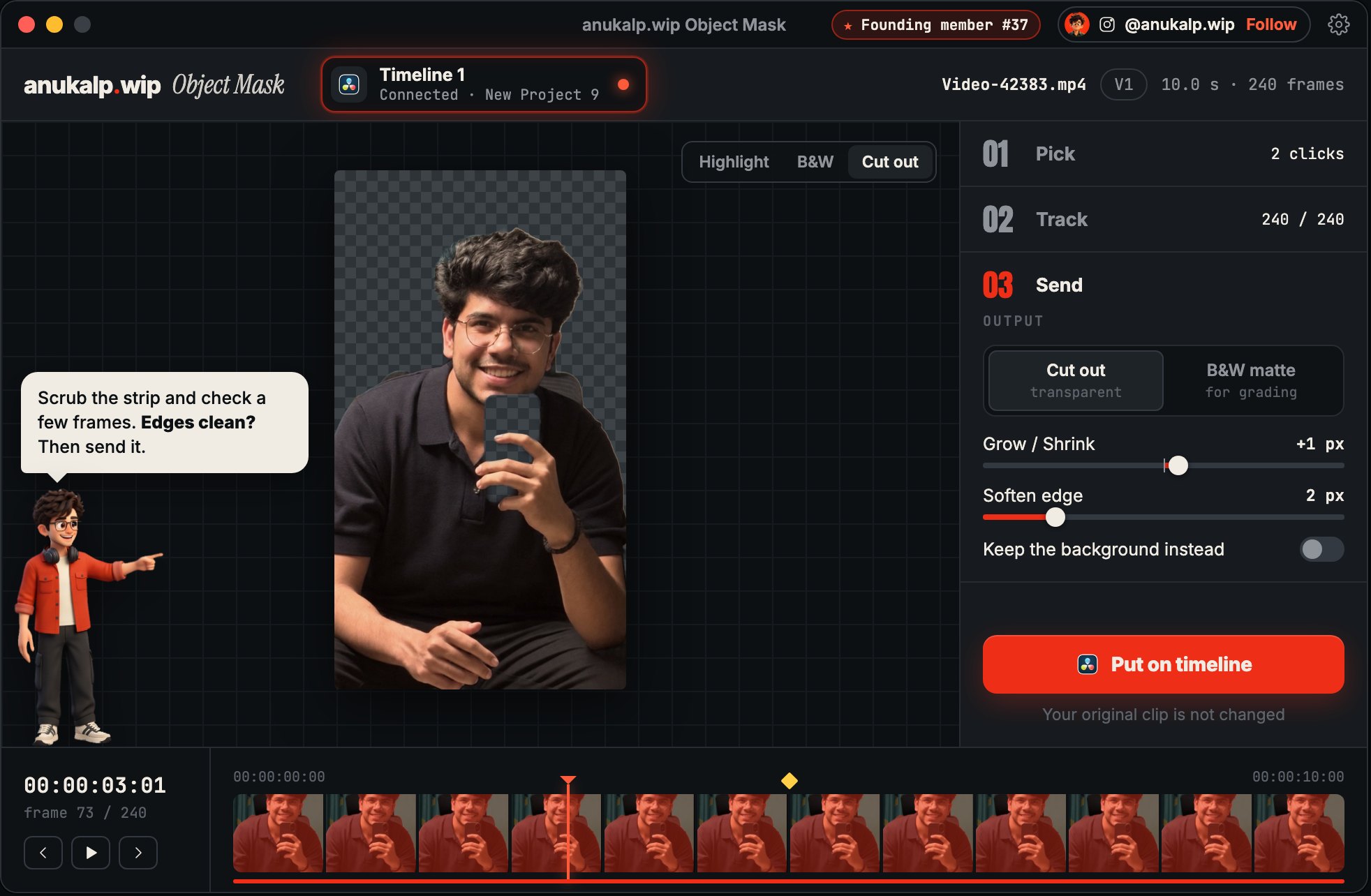
Screens from the app design. Times shown in them are examples.
What it does
Everything you need for a clean cut-out
- Works in DaVinci Resolve free and Studio, from the Scripts menu
- One click selects the whole object; up to 3 objects per clip
- Three outputs: the cut-out, the background without the object, or a black-and-white matte
- Grow / Shrink and Soften edge, with a live preview
- Fine edges for hair and motion blur (optional, slower)
- Play the result before sending, and scrub frame by frame
- Runs on your Mac. Your footage never leaves your computer. No account
- Cool mode keeps your laptop quiet; Fast mode when you're in a hurry
- Updates itself with one click
Use it for
- Text behind a person
- Cut-outs and stickers
- Removing or replacing a background
- Masks for colour grading
Pair it with Giant Word from Text Pack Vol.1 on the track below the cut-out for the text-behind-person look.
Install · about a minute, once
Copy, paste, done
- 01
Download and open the zip
Safari opens it by itself. In Chrome or Firefox, double-click it in Downloads. You get a folder called anukalp.wip-Object-Mask. Leave it in Downloads.
- 02
Open Terminal
Press ⌘ Space, type Terminal and press Return.
- 03
Paste this and press Return
Wait for Installed. It takes under a minute, with no password. If macOS says “Paste blocked”, click Paste Anyway. It may also say om-agent can run in the background: that's the small helper that opens the app from Resolve.
bash ~/Downloads/anukalp.wip-Object-Mask/install.sh - 04
Open it from Resolve
Park the playhead on a clip, then Workspace › Scripts › anukalp.wip Object Mask. Not there? Quit and reopen Resolve.
Moved the folder somewhere else? Open How to install inside it: it shows the command for wherever the folder is, plus a short video.

Or skip the download
This one command downloads and installs it in one go. Paste it into Terminal and press Return.
curl -fsSL https://github.com/Anukalpranjan/anukalp-wip-downloads/releases/latest/download/install.sh | bashOn macOS 26.4 and newer, Terminal may say “Possible malware, Paste blocked” for any pasted command. Clicking Paste Anyway works, or use the download.
Remove it
Paste this into Terminal. It removes the app, its Resolve script and the helper. Your mattes in Movies › anukalp.wip Object Mask stay.
bash ~/"Library/Application Support/anukalp.wip/ObjectMask/uninstall.sh"Requirements
What you need
| Mac | Apple Silicon (M1, M2, M3, M4 or newer). Intel Macs aren't supported. |
|---|---|
| macOS | 13 Ventura or newer |
| DaVinci Resolve | Version 21, free or Studio (tested on 21.0.4) |
| Space | About 300 MB for the app, plus your finished mattes (about 15–25 MB per clip) |
| Windows | Coming later |
FAQ
Questions
Is it free?
Yes, everything is free during launch. Everyone who installs now becomes a Founding member and stays free for good.
Does it upload my footage?
No. The AI runs on your Mac. The app only checks this website for updates when it opens.
Where do the cut-outs go?
Onto the track right above your clip in Resolve. The matte files are saved in Movies › anukalp.wip Object Mask.
The tracking missed a part on some frames.
Use Fix this frame: click the missing part on each bad frame, then Apply. It re-tracks around those frames.
Can I undo it?
Yes. Use Undo in Resolve on the done screen, or delete the orange copy. Your original clip is never changed.
Why only Apple Silicon?
The app is built for M-series chips and runs its AI on their Neural Engine, which keeps it fast and your Mac cool.
How do I remove it?
Paste the remove command from the install section into Terminal. Your mattes stay in Movies until you delete them.
Is there a Windows version?
Not yet. It's coming later. Join the newsletter to hear when it's out.
Known issues: Intel Macs and Windows aren't supported yet. On macOS 26.4+ the one-line install needs Paste Anyway. Something else? Report it here →
Compatibility & releases
Version 0.0.3
| Works on | macOS 13+ (Apple Silicon) |
|---|---|
| DaVinci Resolve | 21 · Free and Studio |
| Released | 20 Oct 2026 |
| Download | anukalp.wip-Object-Mask-Installer-Mac.zip · 163 MB |
| SHA-256 | 0674b498780c42a1aab09845d580e81a136e70662165c10d8c21c500625436d4 |
Release history
- 0.0.3Current20 Oct 2026 · 163 MB
- Layout fix: long clip or timeline names no longer push the side panel and timeline off the window.
- 0.0.219 Oct 2026 · 163 MB
- New app icon: the anukalp.wip mark as a cut-out on a transparent background.
- 0.0.119 Oct 2026 · 163 MB
- First beta for Mac.
A version's file is never swapped. Fixes always come as a new version number.
Free download · Mac · 163 MB
Get Object Mask
Enter your email and we'll send the download link. Install now and you're a Founding member.Downloads open soon. Leave your email and you'll be the first to know.
✓ Email confirmed
You're on the list. We'll email you the moment Object Mask is out.
Downloads aren't open yet. Want an email the moment Object Mask is out?
You're in. Every free plugin on the site is unlocked in this browser.
Credits & privacy
Credits and privacy
Object Mask uses SAM 2.1 and EdgeTAM by Meta, and ViTMatte by HUST Vision Lab, under the Apache 2.0 license (full notices). DaVinci Resolve is a trademark of Blackmagic Design Pty Ltd. anukalp.wip isn't affiliated with Blackmagic Design.
The app works on your Mac and doesn't collect anything about you or your footage. When it opens, it fetches one small settings file from this website, and the image for its “Today from anukalp.wip” card. That's the only network traffic, apart from updates you choose to install.